
 Legal In USA
 Verified on Oct. 22, 2026
 Last used 31 mins ago
 2 min avg claim time


The best ProphetX promo code is COVERS. Enter it during registration to claim the 'Trade $50, Get $75' welcome offer from the newest sports prediction market platform available nationwide.
Now that ProphetX has shifted to a CFTC-approved model, the pitch is even cleaner: I can trade sports event contracts against other users, shop for better prices, and set my own odds.



What is the latest ProphetX promo code in October 2026?
| Prediction market | ProphetX promo code | Welcome bonus | Key terms | Eligibility | Available states | Last verified |
|---|---|---|---|---|---|---|
|
ProphetX |
COVERS |
Min. $50 first trade, no rollover requirement |
New users only |
All states + DC (excl. NV) |
Oct. 21, 2026 |
Quick verdict: Why I like ProphetX
I like ProphetX because it rewards the exact behavior I already preach: shop the number, care about price, and don’t donate margin just because a platform has a nice font. ProphetX uses an exchange-style, peer-to-peer model, so users can trade directly with one another rather than on house-set lines.
The more I use ProphetX, the less I think of it as a sportsbook alternative and the more I think of it as a sports trading platform. Once you stop focusing on picking winners and start focusing on getting the best possible price, the app makes a lot more sense.
The best part? I can set my own prices. Don’t like the price sitting in the market? Post a better one and see if another user wants the other side. That is the ProphetX edge in one sentence: more control, more pricing flexibility, and fewer reasons to yell at your phone. I also love using Quick Trade when I want faster execution.
ProphetX’s help center explains that users can place orders at better prices than the market currently offers, with those orders remaining open until another participant takes the other side.
My best use case for ProphetX
I like ProphetX most when I already have a strong opinion on a game but do not love the price sitting in front of me. That is where the exchange-style model actually matters. I can compare the market, decide whether Quick Trade is good enough, or post my own odds and see if another user wants the other side.
That makes ProphetX especially useful for odds shoppers, live-market users, and anyone who cares about getting the best available number. If I want the fastest possible bet slip, a traditional sportsbook may feel simpler. But if I want more control over the price I take, ProphetX is exactly the kind of app I want open.
Who gets the most value from ProphetX?
I get the most value from ProphetX when I already have an opinion on a game but think the market price can improve. Instead of settling for whatever odds a sportsbook is offering, I can compare prices, use Quick Trade for speed, or post my own number and let the market come to me.
If you're new to prediction markets, I'd still recommend starting with the 'Trade $50, Get $75' offer and focusing on one sport you already know well. Once you get comfortable with pricing, liquidity, and order flow, you'll start using ProphetX differently than a traditional sportsbook—and that's when its biggest advantages become obvious.
Best ProphetX promo code and welcome offer
If you are new to ProphetX, which is one of the best prediction market apps in the U.S., register an account today; the optimal ProphetX promo code is COVERS. I've personally claimed each offer below, and I can confirm their terms are reasonable and attainable for traders of any experience level.

💰 ProphetX welcome offer: Trade $50, Get $75
| ProphetX promo code | ProphetX welcome bonus | Available states |
|---|---|---|
|
All states + DC (except Nevada) |
The best ProphetX promo code right now is COVERS, which unlocks the 'Trade $50, Get $75' welcome offer. I like this bonus because it fits the new ProphetX much better than the old purchase-match language. This is not just “buy coins, get bonus cash” anymore. It’s a cleaner trading offer for a sports prediction market: make a qualifying $50 trade, then get $75 in bonus funds to keep exploring the exchange.
That’s exactly how I used it, too. I made a small first trade, got comfortable with the order flow, then used the extra to test what ProphetX does best: market-driven contracts, price shopping, and creating my own number.
Best way to use the ProphetX welcome offer
I’d use the 'Trade $50, Get $75 ' offer as a low-risk test drive, not as an excuse to get cute immediately. Make your first $50 trade on a market you already understand, then use the $75 bonus funds to try what makes ProphetX different: comparing prices, using Quick Trade, and posting your own odds when the current number is not good enough.
That is the best way to learn ProphetX without overcomplicating it. Start with a familiar sport, keep the first trade simple, and treat the bonus funds like a chance to learn the exchange-style flow before you start thinking like a full-time market maker with a group chat problem.
Before you claim the ProphetX promo code
Before using promo code COVERS, make sure you understand the basics: this is not a traditional sportsbook deposit match. You’ll need to make a qualifying $50 trade, and the bonus funds must be used within the listed expiration window.
I’d also take a minute to learn how ProphetX prices work before placing that first trade. Quick Trade is there when I want speed, but the real ProphetX edge is being able to shop the market, compare prices, and set my own odds when the current number isn't good enough.
What's changed with ProphetX?
ProphetX has evolved rapidly over the past year, and today's platform feels very different from the one I first used. Beyond becoming a federally regulated sports prediction market, ProphetX 2.0 is less about adding flashy features and more about refining every part of the trading experience, from funding an account to entering, managing, and exiting a position. Here are the updates that have impressed me the most.
⚡ ProphetX 2.0: A better sports trading platform
ProphetX feels like a completely different product than it did a year ago. The biggest change was its move to a federally regulated, sports-first prediction market, where I now trade real event contracts on a CFTC-approved exchange instead of using the platform's previous sweepstakes model. ProphetX 2.0 feels like the point where the product has really come together, with a redesigned interface, a smoother trading experience, and tools that make the platform feel much closer to a modern financial exchange than a traditional sportsbook.
For me, the biggest difference is that ProphetX now feels like a platform I can use every day instead of one I occasionally checked for value. It's faster, more intuitive, and much easier to recommend to anyone who already enjoys shopping for the best price.
🧩 ProphetX Parlay Mode
One of my favorite additions is Parlay Mode, which packages ProphetX's exchange-style parlay system into a much cleaner, sportsbook-style interface. Instead of hunting through individual markets, I can now browse parlay-eligible NFL, MLB, college football, soccer, UFC, and other sports from one dedicated screen, making it much faster to build multi-leg trades.
What I like most is that ProphetX hasn't abandoned its exchange roots. Behind the scenes, Parlay Mode still uses the platform's Request for Quote (RFQ) technology, so I'm receiving quotes from market makers instead of simply accepting fixed sportsbook odds. The builder also supports same-game parlays, cross-sport combinations, and expanded player-prop milestone markets, giving me far more flexibility than the original workflow. Recent updates have also added market search and alternate spread and total sliders, making the builder much easier to navigate.

📊 Full Order Book
The feature I appreciate most is the redesigned Full Order Book. Instead of simply seeing the best available price, I can now view the full depth of the market, including every available price and exactly how much liquidity sits behind each one. That transparency helps me decide whether to trade immediately or wait for the market to come to me before placing an order.
I also like that the Order Book removes much of the guesswork. Instead of wondering whether a price is likely to move, I can see where other traders are willing to buy and sell, making it much easier to judge how aggressive I want to be before entering a position.
⚡ Quick Trade, RFQ & Make Your Own Odds
Quick Trade makes it much easier to jump into a position when I want immediate execution, while the ability to make my own odds still separates ProphetX from almost every sportsbook I use. I like having both options because sometimes speed matters more than price, while other times I'm happy to wait for the market to meet my number.
ProphetX has also continued refining its Request for Quote (RFQ) workflow, making it easier to negotiate pricing on multi-leg trades while preserving the flexibility of a true peer-to-peer exchange. If I think the market is mispriced, I can post my own number and wait for another trader to take the other side instead of simply accepting whatever price is available.
💳 Faster Funding & New Payment Options
Funding the platform has become much more convenient. Alongside 24/7 funding through EDGE Boost and crypto and stablecoin funding powered by zerohash, ProphetX now supports additional payment methods, including Apple Pay and debit cards. For a platform where prices move constantly, reducing the time between spotting value and getting money into the market is one of the most meaningful upgrades.
These improvements may not be as exciting as a new trading feature, but I notice them every time I use the platform. The less time I spend moving money around, the more time I can spend comparing prices and managing positions.
🌐 ProphetX is growing beyond its own app
One thing I'm especially excited to watch is how ProphetX is expanding beyond its standalone platform. Recent partnerships with ParlayX, Agg Market, Boom Sports, and Pikkit are bringing ProphetX's federally regulated sports markets to new audiences and platforms.
I also like that ProphetX is focused on expanding the exchange itself rather than simply adding more markets. A larger user base can create deeper liquidity, tighter pricing, and a stronger trading experience for everyone already using the platform.
💵 Cash Out
One addition I really like is Cash Out, which lets me close a position before the underlying event finishes instead of waiting for final settlement. That gives me another way to manage risk, lock in profits, or reduce losses as market prices move throughout a game.
Combined with the Full Order Book, live pricing, and peer-to-peer trading, Cash Out gives me much more control over how I manage a position from entry to exit. That flexibility makes ProphetX feel much more like a true trading platform than a traditional sportsbook.
🎯 Who benefits most from ProphetX 2.0?
I think ProphetX 2.0 is a much bigger upgrade for experienced sports bettors than casual users. If I'm already comparing prices across multiple sportsbooks, the Full Order Book, Quick Trade, make-your-own-odds functionality, and Cash Out tools give me much more control over every trade.
There's still a learning curve compared to placing a standard sportsbook bet, but the redesigned interface, improved funding options, and streamlined trading flow make the platform far more approachable than it was a year ago.
🏈 A Better Time to Try ProphetX
What I enjoy most is that ProphetX hasn't tried to become another all-purpose prediction market. It has doubled down on sports, refined the exchange, and continued adding features that benefit active traders rather than distracting from them.
The new Trade $50, Get $75 welcome offer also arrives at the perfect time. It gives me a chance to explore ProphetX 2.0, learn how the exchange works, and experience features like the Full Order Book, Quick Trade, and Cash Out before committing much of my own bankroll.
How to claim the ProphetX promo code
I joined one of the best peer-to-peer prediction market exchange platforms using these easy instructions. It's easy to claim one of the best prediction market promos, and it only took me a few minutes.
Click our link and create your ProphetX account
Launch the ProphetX app (available on the App Store and Google Play Store) or the desktop site to be redirected to the registration page. Click the 'Register' button and provide personal information, including your full name, date of birth, mailing address, Social Security number, and phone number. I had to verify my identity by providing a photo of my driver's license or passport.
ProphetX sent me a text message containing a one-time PIN to activate my new account, adding an extra layer of security.
Remember: I entered the ProphetX promo code COVERS during registration to qualify for the promotion. Once I entered that, I unlocked the bonus.
Deposit funds
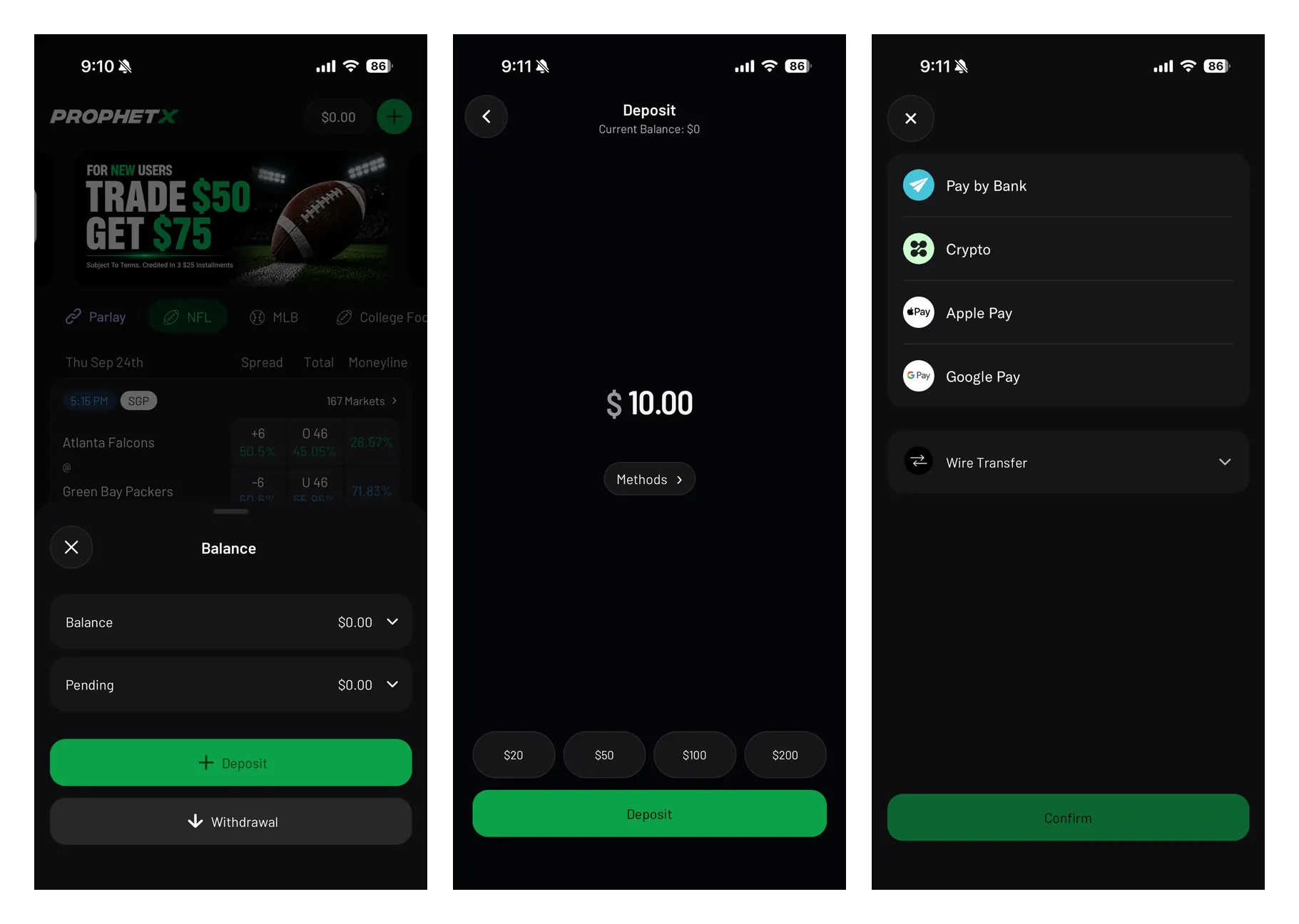
I then navigated to the banking section, chose a payment option, entered the amount, and confirmed my transaction. I made a minimum deposit of $10 to qualify, although admittedly I deposited more to give myself a solid runway to play around.
Make your first $50 trade
With funds in my account, I could now search through ProphetX's available trading markets and start placing trades.
Receive $75 in bonus funds
Once eligible, I used my bonus funds to keep trading sports prediction markets.
Withdraw your funds
Once I met all conditions, I selected 'Withdraw', chose a vendor, and entered the amount I wanted to withdraw. My withdrawal claim was processed within 24 hours, though ProphetX indicates that some methods may take longer in 2026.
My experience claiming the ProphetX promo code
Create and verify your account: Start by choosing 'Continue with Email', then enter your email address and create a secure password. ProphetX sends a six-digit verification code to confirm your email before moving forward.
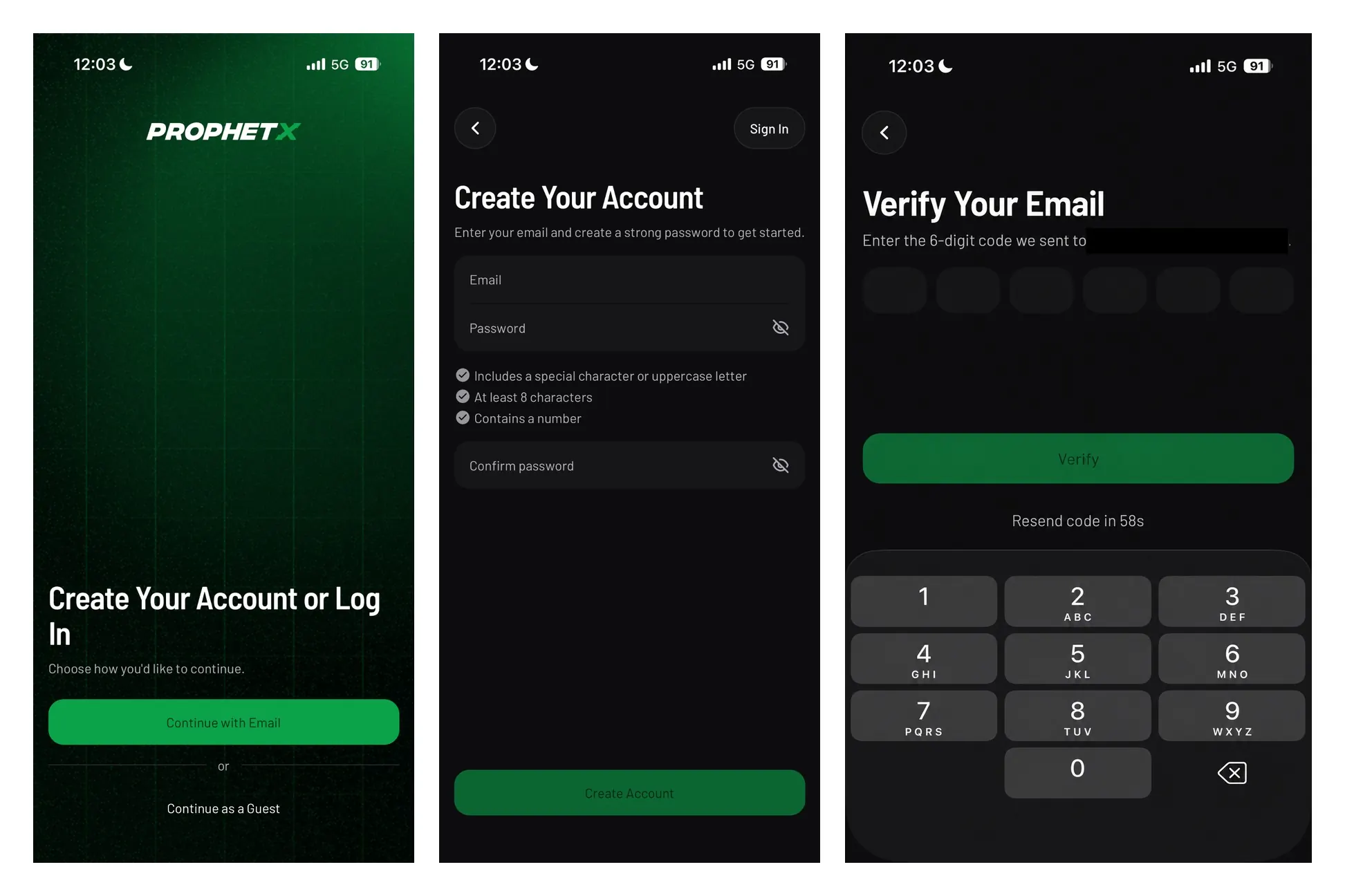
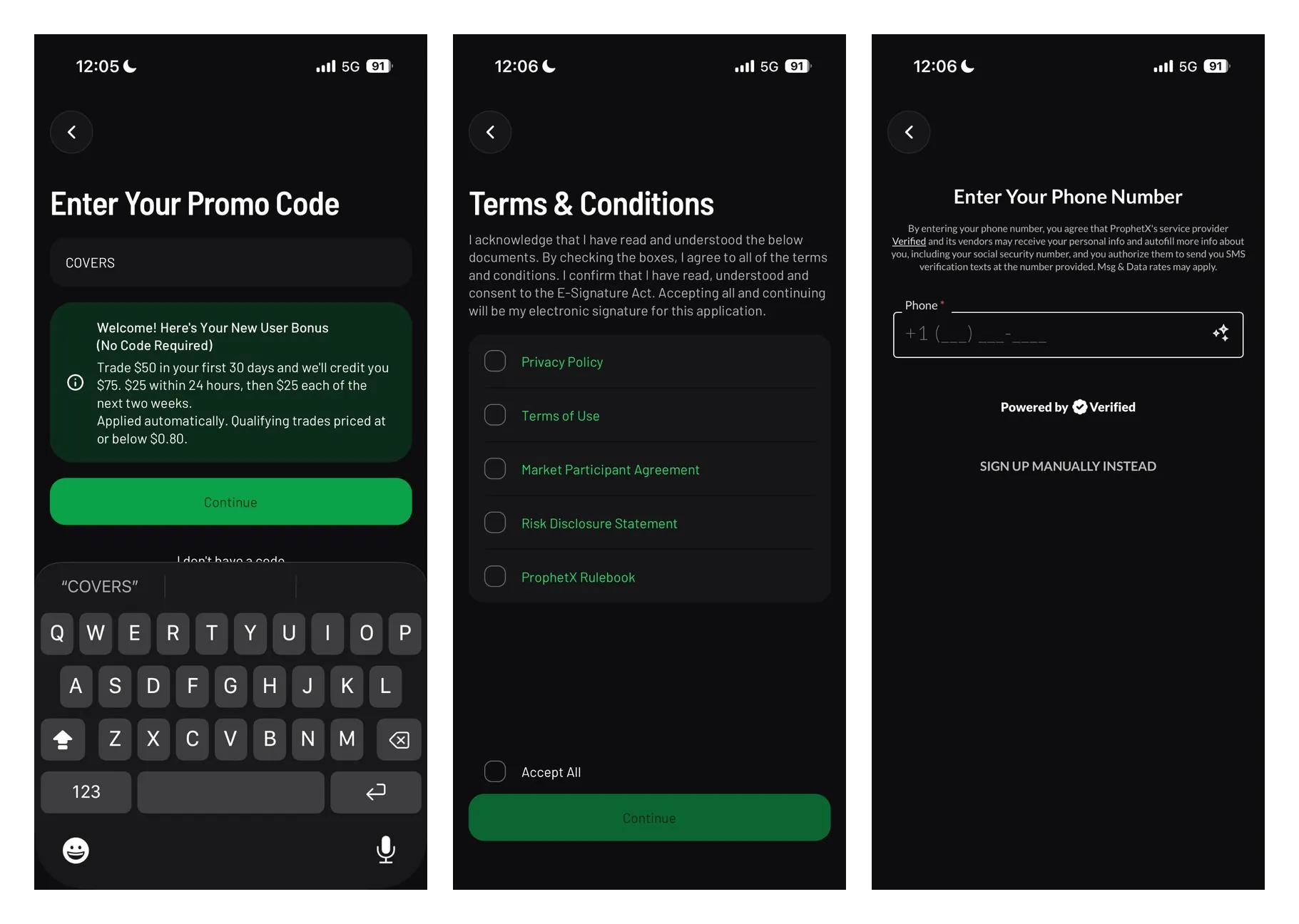
Enter your promo code and accept the terms: Enter promo code COVERS during registration to associate it with your account, then review and accept ProphetX’s required agreements. The signup process then moves into phone verification.
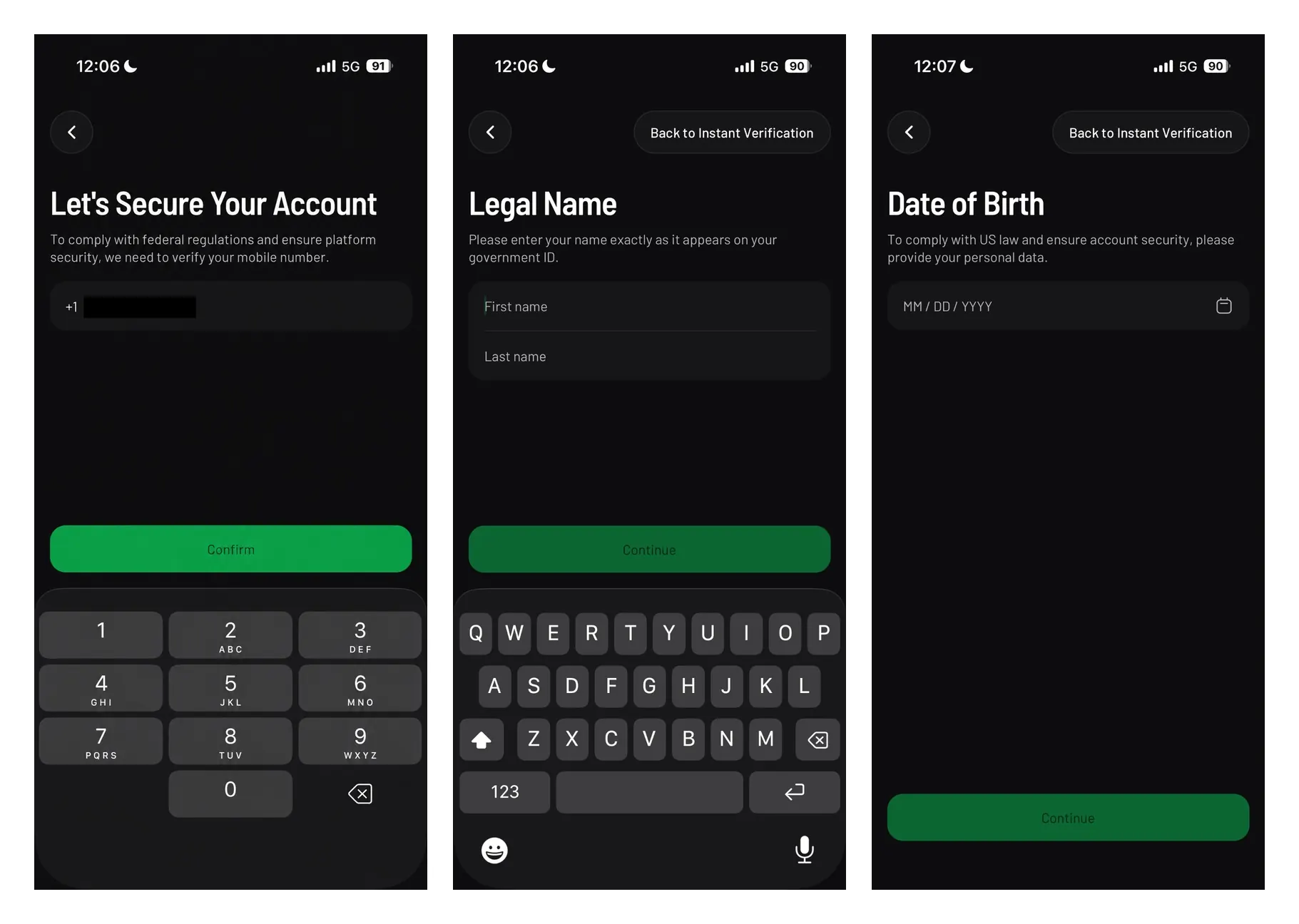
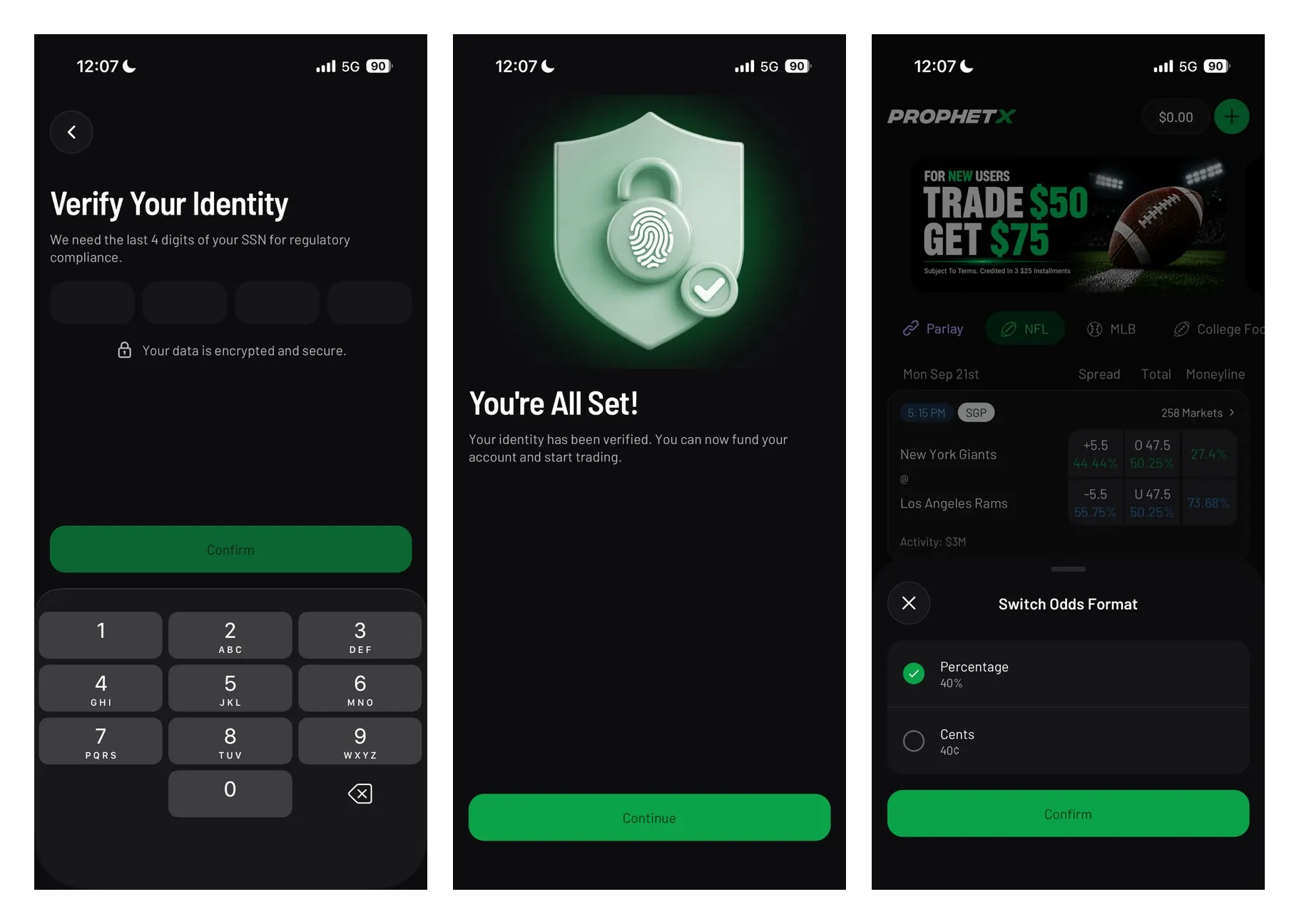
Complete identity verification: ProphetX asks for personal information including your legal name, date of birth, and the last four digits of your SSN. These details are used to verify your identity and satisfy regulatory requirements.
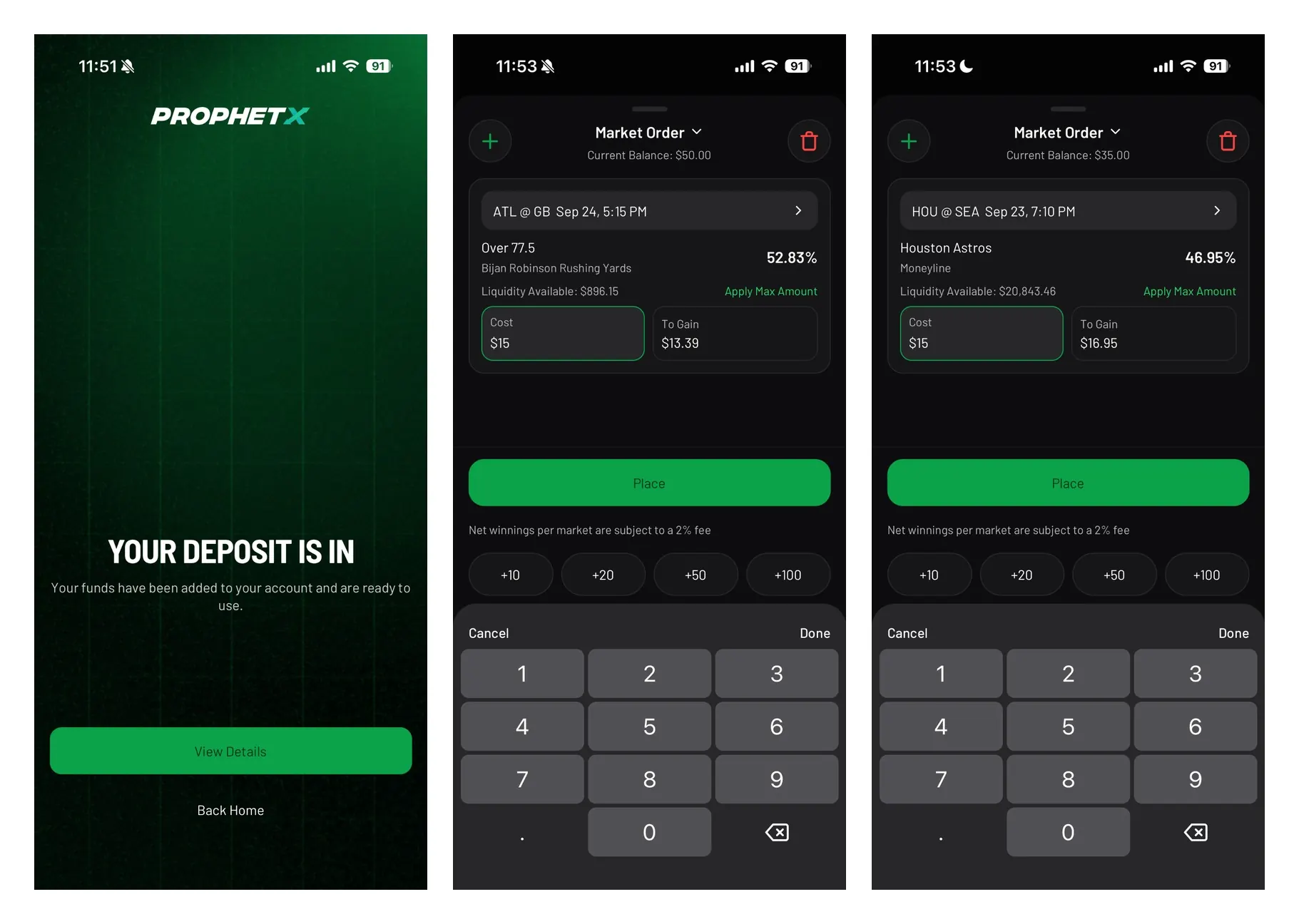
Finish verification and access ProphetX: Once your identity is verified, ProphetX confirms that your account is ready to fund and trade. From the main interface, you can view available markets and access your balance to make a deposit.
Fund your ProphetX account: Choose your deposit amount and select from the available funding methods, including bank transfer, crypto, Apple Pay, and Google Pay. ProphetX confirms when the deposit has successfully reached your account.
Start trading: After funding your account, you can review the deposit details and begin placing market orders. The order ticket displays the contract price, available liquidity, cost, potential return, and applicable trading fee before you place the trade.
ProphetX refer-a-friend bonus
ProphetX also offers a refer-a-friend deal, and it's delightfully simple: Give $25, Get $25. Your friend gets a $25 credit once they qualify, and you get $25 for your first qualifying referral. Even better, ProphetX’s terms say the referrer credit increases by $5 for each additional qualifying referral, up to $50 per qualifying referred participant.
Thatis a rare referral offer where “tell your group chat” is a reasonable strategy.
ProphetX referral terms
| Offer | Give $25, Get $25 |
| Friend reward | $25 account credit |
| Referrer reward | $25 for first qualifying referred participant |
| Scaling reward | Referrer credit increases by $5 per additional qualifying referral, up to $50 |
| Friend requirement | New user must use referral code/link, be approved, deposit at least $50, and execute $50+ in aggregate notional trades. |
| Bonus use | Incentive funds can be used for new trades |
| Expiration | Incentive funds must be used within 45 calendar days. |
| Expiry date | June 16, 2027 |
| Last verified | Oct. 22, 2026 |
I love to see lucrative programs similar to the Kalshi referral code, as well as the Polymarket referral code.
Liquidity Rewards Program
ProphetX also has a Liquidity Rewards Program, which gives active users another way to earn beyond the standard Trade $50, Get $75 welcome offer. This is not really a beginner bonus. It is built for users who understand market making, limit orders, and why liquidity matters on a peer-to-peer sports prediction exchange.
The idea is simple: ProphetX rewards users who help make eligible markets easier to trade. When users provide liquidity, they are helping create better market depth, tighter pricing, and a smoother trading experience for everyone else. ProphetX’s leaderboard tracks daily rankings and payout snapshots across eligible categories, with rewards weighted by market-making activity.
I like this program because it fits ProphetX’s identity. The welcome offer gets you in the door, but liquidity rewards are for users who want to do more than just take the current price. If you are placing limit orders, watching market depth, and trying to create better prices, this is the kind of promo that makes ProphetX feel more like a true sports trading exchange than a standard sportsbook alternative.
| Liquidity Rewards detail | What to know |
|---|---|
| Promo type | Ongoing liquidity / market-making rewards |
| Reward format | Prophet Cash |
| Best for | Active traders and market makers |
| How it works | Rewards are tied to liquidity-providing activity on eligible markets |
| Tracking | ProphetX shows daily rankings and payout snapshots |
| Eligible categories | Vary by program and may include sports categories such as NBA, MLB, and NHL |
| Beginner note | Start with the 'Trade $50, Get $75' welcome offer before worrying about liquidity rewards |
ProphetX is now a CFTC-regulated sports prediction market
Here’s the big update: ProphetX is no longer just an exchange-style sports app. ProphetX LLC is now listed by the CFTC as a Designated Contract Market, and the CFTC’s clearing organization list shows ProphetX LLC as a registered Derivatives Clearing Organization. In plain English, ProphetX now has the regulatory setup to operate as a sports-native prediction market exchange and clearinghouse.
That matters because prediction markets are not traditional sportsbooks. You’re trading contracts tied to event outcomes, and market prices are shaped by other participants. The CFTC explains that event contracts are often yes/no-style markets where the price reflects the market’s expectation of an outcome.
ProphetX didn’t just get a fresh coat of paint. It moved into a sharper regulatory lane, and for a sports-first exchange, that’s a big deal.
For a comparison with a platform taking a different regulatory and infrastructure path, our ROLR promo code guide tracks ROLR’s planned real-money rollout through Crypto.com Derivatives North America and its current promotional status.
How does ProphetX work?
ProphetX works like an exchange, not a traditional sportsbook. Instead of betting against the house, I trade against other users. I can take the best available price, use a faster order type when I want action, or post my own prices and wait for another trader to match me.
That’s the whole ProphetX appeal: don’t like the number? Make a better one.
How ProphetX contract prices work
ProphetX prices are best understood as a market view of probability. Instead of seeing a traditional sportsbook line like -110 or +120, you’re trading sports event contracts where the price reflects what the market thinks an outcome is worth at that moment. That is the mental switch I had to make when using ProphetX.
I’m not just asking, “Do I like this team?” I’m asking, “Do I like this price?” If the market price moves in my favor, I may be able to sell my position before the event settles. If I hold through the final result, the contract settles based on the event's outcome. This is why ProphetX feels more like sports trading than a standard sportsbook.
The price can move before the game starts, during live action, or as other users take positions. That makes timing, liquidity, and price control more important than simply picking a winner.
Make your own odds
This is my favorite ProphetX feature. You do not have to accept the price sitting in front of you. If the market has +110 and I want +120, I can request my price and let another user decide whether to match it. Sometimes it fills. Sometimes it sits there judging me. Either way, I had control.
Quick Trade vs. Make your own odds
ProphetX gives me two very different ways to trade, which is why I like the app more the longer I use it. Quick Trade is the fast lane when I want action right away. Make your own odds is the sharper lane when I care more about getting the exact price I want.
| Feature | Best for | How I use it |
|---|---|---|
| Quick Trade | Speed | Use this when I want to enter a market quickly and take the best available price based on current liquidity |
| Make your own odds | Price control | I use this when I do not like the current market price and want to post my own number for another user to match. |
| Limit orders | Patience | I use these when I’m willing to wait for a better price, knowing the order may not fill. |
| Liquidity pool | Trade sizing | I check this before placing larger trades, so I know whether my order can fill immediately or might sit partially unmatched. |
Peer-to-peer trading
ProphetX’s exchange model lets users request and match prices directly against one another. ProphetX says this creates a more competitive environment and can result in better prices.
Quick Trade / Market Order
For users who don’t want to build every trade by hand, ProphetX’s Quick Trade-style flow should be framed as the fast lane. ProphetX’s market-order help page says market orders are designed for faster execution: users enter their cost, the system fills at the best available price based on liquidity, and the trade appears in My Trades once filled.
The bottom line: Quick Trade is for when speed matters. Making your own odds is for when price matters. I like having both, because sometimes I’m patient and sometimes kickoff is in 47 seconds.
Limit orders and resting orders
ProphetX explains that if you request a price more favorable than anything currently available, your order can rest in the market until another participant fills it. Users can also set notifications when a resting order gets filled.
Liquidity pool
ProphetX’s liquidity article says the liquidity pool is displayed under each price and shows how much cash is available at that specific price. This is a great feature to explain because it helps users understand whether their order can be filled immediately, partially filled, or sit in the market.
ProphetX fees and commissions
ProphetX’s fee setup is one of the biggest reasons I’d push this app to price shoppers. Instead of baking a sportsbook-style margin into every line, ProphetX charges trading fees. According to ProphetX’s help center, straight trades carry a 2% trading fee on net gains per market, while parlay trades carry a 0% trading fee on net gains per market.
That is much easier to explain than vig. You still need to compare prices, account for fees, and understand liquidity, but transparent costs are paramount for me.
 Covers Expert Analysis
 Christian Stringer, Prediction Markets Editor
ProphetX payment options
ProphetX currently lists several funding options, including Visa, Mastercard, Aeropay, ZeroHash, Discover, PayNearMe, and Trustly. The table below outlines the listed minimums, processing times, and fees, but availability can vary by account and may change as ProphetX updates its payment partners.
Before depositing or withdrawing, confirm the current options displayed in your cashier and use a payment method registered in your own name. ProphetX may use third-party payment processors to complete account funding and payouts.
For a useful comparison with a crypto-native platform, our Gemini promo code guide covers Gemini's prediction-market offer and product details.
| Method | Deposit | Process Time | Minimum Amount | Fee |
|---|---|---|---|---|
| Aeropay | ✅ | Instant | $5 | Free |
| ZeroHash | ✅ | Instant | $5 | Free |
 Visa Visa |
✅ | Instant | $5 | Free |
 Mastercard Mastercard |
✅ | Instant | $5 | Free |
 Discover Discover |
✅ | Instant | $5 | Free |
 PayNearMe PayNearMe |
✅ | Instant | $5 | Free |
 Trustly Trustly |
✅ | Instant | $5 | Free |
Covers Expert Analysis Sky Smith, Prediction Markets Editor
What markets can I trade with ProphetX?
One of the biggest reasons I enjoy ProphetX is its sports-first approach. It easily earns a spot on my list of the best NFL prediction markets and NBA prediction markets because it focuses on the markets I actually trade most often instead of trying to cover every headline or current event.
I can trade major U.S. sports like the NFL, NBA, MLB, NHL, college football, and college basketball, along with soccer, MMA, boxing, golf, tennis, Formula 1, NASCAR, and esports. ProphetX also supports live markets, player props, and combo-style trading, giving me plenty of ways to find value without feeling overwhelmed by unrelated event markets.
Will ProphetX offer politics, economics, breaking news, and culture markets?
ProphetX is sports-native today, but ProphetX’s own announcement says the company is built on a sports-native foundation and designed to expand across a broad range of event markets. Broader event-market expansion appears to be on the way.
Here are the potential markets that I'm watching for ProphetX to offer in the future:
- Politics
- Economics
- Breaking news
- Cultural markets
- Weather
- World events
One thing I appreciate is that ProphetX keeps its focus on sports, while some prediction-market platforms spread across politics, economics, and current events.
For another look at how prediction-market platforms differ in their product and market offerings, see our Polymarket vs. FanDuel Predicts comparison.
Today's sports prediction markets to use the ProphetX promo code on
Today's ProphetX board is led by the upcoming MLB World Series, with Tampa Bay Rays vs. Milwaukee Brewers beginning tomorrow, Friday, October 23. I'm comparing available championship and series markets while checking ProphetX's Quick Trade prices against what I could get by posting my own number.
NFL Week 7 begins tonight with Patriots vs. Bears, bringing fresh game-winner, Over/Under, and player markets. I'm comparing prices and liquidity alongside Super Bowl, division, playoff, and MVP futures. The NBA regular season also continues tonight with Cavaliers vs. 76ers and Nuggets vs. Thunder, giving me another major sport to explore as basketball trading picks up.
What makes ProphetX different from sportsbooks?
ProphetX is built for the person who sees -110 and immediately asks, “Fine, but who has -104?” In other words, my people.
The big difference is that ProphetX is not a traditional sportsbook. It is a peer-to-peer sports prediction exchange where users compete on price. You can take the current market, post your own odds, trade live, build parlays, and use the app like a sports trading platform instead of a place where the house hands you a number and dares you to do better.
- Set your own prices: Don’t like the current price? Request your own and let the market come to you.
- Quick Trade: For faster execution, use the simple trade flow and take the best available price based on liquidity.
- Low commissions: 2% on straight-trade net gains and 0% on parlay-trade net gains, per ProphetX’s current help center.
- Peer-to-peer model: You’re trading against other users, not a sportsbook holding the other side.
- Better odds potential: ProphetX’s app listing says users compete on price in an open peer-to-peer marketplace, which can create better odds and tighter spreads.
- No artificial limits: ProphetX’s app listing says the platform is built for users who want to keep trading as they improve, with no artificial limits placed on success.
- Sports-native prediction market: ProphetX is not treating sports like a side quest. Sports are the product.
If you want to compare that exchange-style setup with a more social sports-prediction experience, our Onyx promo code guide explains how Onyx works, its current welcome offer, and what to expect from the platform.
ProphetX promo code comparison
I've detailed how the ProphetX bonus offer compares to the Kalshi promo code and Polymarket promo code below.
If you're comparing ProphetX with other sports-first prediction market platforms, visit our Underdog promo code page for the latest offer, eligibility details, and current terms.
 ProphetX ProphetX |
 Novig Novig |
 Kalshi Kalshi |
|
|---|---|---|---|
| Compare | Pin | ||
| Welcome bonus | Trade $50, Get $75 | Deposit $10, Get $50 | Exclusive $60 Bonus |
| Promo code | COVERS | COVERS | MAX60 |
| Bonus type | Trade and get | Deposit and get | Trade and get |
| Bonus form | Up to $75 | Ten (10) Trade Credits of $5.00 each | One (1) $60 bonus |
| Min. deposit | $10 | $5 | $10 |
| Top daily promos | Refer a friend | Challenge rewards | Referral bonus |
| Covers BetSmart Rating | ⭐ 4.7/5 | ⭐ 4.8/5 | ⭐ 4.9/5 |
| Claim Bonus | Claim $75 | Claim $25 | Claim $60 |
Compare Novig and Kalshi across pricing, liquidity, apps, and availability in our full Kalshi vs Novig guide.
What I like about the ProphetX promo code

The make-your-own-odds feature is the star
This is the feature I recommend most. It is simple, useful, and easy to explain: if you think that the current price is not good enough, request your own.
Quick Trade makes the app less intimidating
Not every user wants to manage limit orders on Day 1. A fast, market-order-style flow helps ProphetX onboard users who want speed before they get fancy.
The fee model is clean
Straight trades at 2% of net gains and parlays at 0% of net gains is strong, simple copy.
The app is built for price people
The Google Play listing literally says ProphetX is designed for users who think in terms of price and probability. That is a perfect line to echo in your own voice.
What I don't like about the ProphetX promo code
The ProphetX code does have some room for improvement:

Beginners need education
ProphetX should not assume every user understands market orders, limit orders, resting orders, liquidity, partial fills, and settlement. The page can help close that gap.
Liquidity matters
The best exchange experience depends on available liquidity. If there is not enough cash at your preferred price, your order may be partially filled or left in the market.
The broader event-market story is still developing
ProphetX is clearly sports-native today. I’d avoid promising politics, economics, culture, or breaking-news markets until they are visible and confirmed.
Short runway for the promo
There's not much time to get your feet wet and experience the full suite of trading without a decent investment.
Covers Expert Analysis Christian Stringer, Prediction Markets Editor
ProphetX customer support
ProphetX needs to significantly improve its customer support to match the competition, as it currently falls short of expectations. You can only contact them between 10 a.m. and 10 p.m. ET, as ProphetX does not offer 24/7 live or phone support. Hopefully, they'll add this in the near future, since it's usually the fastest way to reach an agent.
While it has an active social media account, Discord channel, and email address, we hope ProphetX expands its customer support capabilities in the future, especially since most other sites offer live chat. The good news is that if this platform continues to grow, customer support will likely become more accessible.
With that said, in my experience, the options that were available had a quick response time for email queries, so it didn't take away from the platform too much, which is good news.
- Live chat: N/A
- Email: hello@betprophetx.co
- Phone: N/A
- Support languages: English
- X (Twitter): @PlayProphetX
ProphetX review
I think ProphetX is best for users who care about price. That sounds obvious, but it’s the whole ballgame. Traditional sportsbooks give you a line. ProphetX gives you a market. That means I can take a price, request a better one, use Quick Trade for speed, or let an order rest until it gets matched.
The new CFTC-approved structure makes the review stronger because trust is now a much bigger part of the story. The CFTC lists ProphetX LLC as a designated contract market, and the CFTC’s DCO list shows ProphetX LLC registered as a derivatives clearing organization.
 Who it's for
ProphetX is one of the most interesting sports prediction market apps in the U.S. because it gives value shoppers what we actually want: better price control, peer-to-peer trading, transparent fees, and the ability to set our own prices.
ProphetX may not be the easiest platform for total beginners. I would say there is definitely a learning curve, especially if you’re used to a sportsbook bet slip doing all the thinking for you. But if you already compare odds, think in implied probability, or have ever muttered “bad number” like it’s a personal betrayal, ProphetX is absolutely worth a look.
 Covers TradeGrade Rating: ⭐ 4.7/5
 | Bonuses and promotions | ⭐ 3.5/5 |
| Banking and payout speed | ⭐ 4.2/5 |
| Key features | ⭐ 4.2/5 |
| Security and trust | ⭐ 4.5/5 |
| Customer support | ⭐ 3.0/5 |
| User experience | ⭐ 4.0/5 |
| Market pricing | ⭐ 4.5/5 |
 User reviews
 "For those who live in states without traditional sportsbooks, ProphetX is a godsend! The odds are incredible. Just want to give a big thank you to the folks behind this app."
- App Store reviewer
"Easy to navigate, lots of options to satisfy desire. Support staff responded to my question quickly. The ProphetX exchange is a great advantage because you're betting against other people, not the house; this means you can never be limited. Overall, the app, along with the exchange itself, makes for an enjoyable (and hopefully profitable) experience for both beginners and experienced bettors."
- Chris, Google Play Store user
ProphetX promo code at a glance
| 💰 Sign-up bonus | Trade $50, Get $75 |
| ⏩ ProphetX promo code | COVERS |
| 🏅 Top feature | Set your own prices |
| 💵 Minimum deposit | $10 |
| 🕒 Payout speed | Varies by method; verify in cashier |
| 🍎 App Store rating | 4.8/5 ⭐ (3.5K reviews) |
| 🤖 Google Play rating | 4.3/5 ⭐ (747 reviews) |
| 🌎 Available states | All states + DC (except Nevada) |
| 🕒 Offer expiry | Ongoing |
| ✅ Last verified | Oct. 22, 2026 |
What we like
What we don't like
ProphetX app review
From a product standpoint, the ProphetX mobile app works best when I treat it like a sports trading screen, not a sportsbook clone. The app centers on prices, liquidity, order types, and position management, so the experience feels more active than just tapping a moneyline and waiting. I like that because ProphetX’s appeal is control: I can move quickly with a market-style order, or I can be pickier and set my own odds when I think the current price isn't good enough.
That also means ProphetX is not the softest landing spot for total beginners. A standard sportsbook app does more hand-holding. ProphetX asks users to understand what they’re buying, what price they’re taking, and whether there is enough liquidity to fill the order. Once that clicks, though, the app becomes much more interesting. It gives me the tools I actually want as a price-sensitive user: faster trades when I need speed, limit-style control when I want a better number, and a clear look at how the market is moving.
🍎 ProphetX iOS rating
On the App Store, the ProphetX mobile app has an excellent 4.8/5 rating based on more than 3,500 reviews. The app is listed at 75.5 MB and requires iOS 16.0 or later, so it is a fairly light download compared to some bulkier prediction market apps.
I found the iOS experience especially useful for quick market checks. It does not feel like an app trying to bury me in promos before I can find the actual board. The focus is where it should be: available markets, prices, order entry, and account tools. That matters because ProphetX is only as good as its execution flow. If I’m trying to grab a number before it moves, the app cannot feel like it needs a coffee first.
🤖 ProphetX Android rating
The ProphetX Android app holds a strong 4.3/5 rating on the Google Play Store. I’ve noticed Android users warming up to the improved ProphetX experience, especially as the app has become more polished, trading-focused, and easier to navigate.
That matters because ProphetX is not a basic sportsbook clone. Android users need the app to handle live markets, quick trades, order flow, and price movement without feeling clunky. The current rating suggests ProphetX is heading in the right direction, with a mobile experience that better matches its exchange-style, odds-shopping identity.
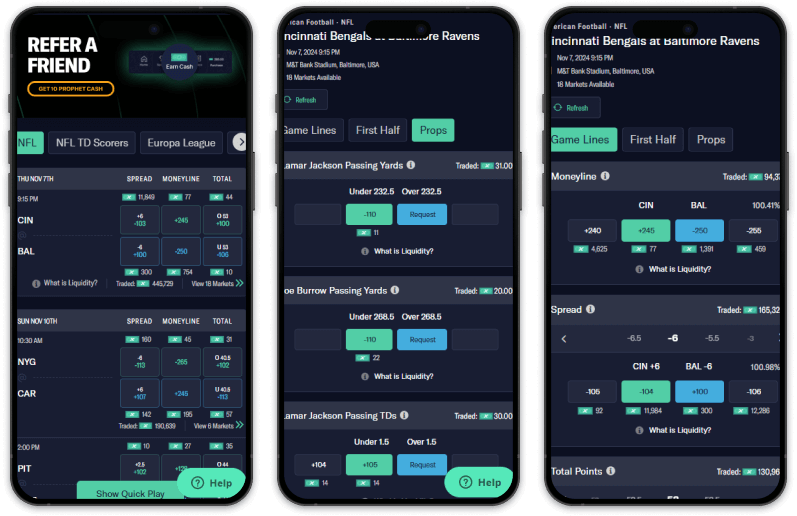
ProphetX iOS app
📱 ProphetX app design
The ProphetX app has a clean, price-first layout that makes more sense the longer you use it. It doesn't try to win me over with a giant promo carousel or casino-style distractions. The app focuses on markets, odds, liquidity, and order placement, which is exactly what I want from a sports prediction exchange.
The biggest thing I noticed is that ProphetX rewards patience. I can use the faster trade flow when I want to get into a position, but the app becomes more valuable when I slow down, compare prices, and decide whether to take the current market or set my own odds. That is the difference between using ProphetX like a sportsbook and using it like an exchange.
- Quick Trade: Quick Trade is the beginner-friendly lane. It lets me enter a position faster without manually choosing every price. ProphetX says its market-order flow fills at the best available price based on liquidity, which makes it useful when speed matters more than squeezing every last cent out of the number.
- Make your own odds: This is still the app’s signature feature. ProphetX lets me create my own price and wait for another user to match it. For odds shoppers, that is the whole appeal. I don’t just want to choose from the prices on the board; I want the chance to make the board blink first.
- Market orders vs. limit orders: ProphetX’s app gives users two very different paths. Market orders are better when I want a faster fill. Limit orders are better when I care more about price control and am willing to risk not getting matched. That tradeoff matters, and the app does a good job of making ProphetX feel more like a trading product than a standard betting slip.
- Liquidity and partial fills: ProphetX shows liquidity under each price, which tells me how much is available at that number. That is a small detail with a big impact. If I try to trade more than the available liquidity, part of the order may fill, and the rest may sit in the market. That is not a bug; that is how an exchange works. But new users need to understand it before they wonder why not every trade behaves like a sportsbook bet.
📈 ProphetX app improvements
ProphetX has clearly been tuning the app around its new sports prediction market identity. Recent updates have focused on performance, market stability, and smoother execution, the exact areas that matter when an app handles live prices and real-time order flow.
The ProphetX mobile app was updated in October 2026 to Version 2.4.1, with the biggest product shift being the ability to trade sports prediction markets across the U.S. That is not just a routine app-store note. It changes how I view the product. ProphetX is no longer just an exchange-style sports app with a niche audience; it's positioning itself as a serious mobile trading platform for sports event contracts. The Order Book is one of ProphetX's latest app updates.
Compared to other prediction operators, ProphetX is noticeably slower with its app updates; there are legitimate weeks between improvements. I wish ProphetX described its app improvements in more detail in the App Store, as the updates are quite general and vague.
⭐ ProphetX mobile app key features
ProphetX’s strongest mobile features give users more control than a traditional sportsbook app. The app supports peer-to-peer sports markets, buy/sell-style position management, market-driven pricing, Quick Trade, limit-style order control, and real-time portfolio tracking.
The feature mix makes the app especially useful for users who want to enter and exit positions rather than be locked into a single pregame opinion. I also like that ProphetX makes pricing feel more transparent. I can see the number, decide whether I like it, and choose whether speed or price control matters more in that moment.
🚀 What sets the ProphetX mobile app apart
What sets the ProphetX app apart is not just its better odds-shopping language. It actually gives users tools that support that behavior. Quick Trade is there when I want speed. Set-your-own-odds functionality is there when I want control. Liquidity visibility is there when I need to know whether a trade can actually be filled.
That is why ProphetX feels different from a traditional sportsbook app. The house isn't just handing me a number and asking whether I want it. ProphetX gives me a market, lets me choose how aggressive I want to be, and makes pricing part of the decision. That will not be for everyone, but for experienced bettors, arbitrage-focused users, and anyone who cares about getting the best possible number, the app has a clear and useful lane. It is undoubtedly one of the best alternative apps like Novig.
Why I'm even more bullish on ProphetX now
ProphetX is no longer just building a better sports prediction market app; it's becoming the technology behind other sports platforms. Recent partnerships with Pikkit and Boom Sports mean more sports fans can access ProphetX's CFTC-regulated prediction markets without ever downloading the standalone app. I like this direction because more users generally lead to healthier liquidity, tighter pricing, and a better trading experience for everyone.
The platform is also improving the experience around the edges. New funding integrations like EDGE Boost let users move money into ProphetX in real time, even outside traditional banking hours. For a product built around live sports trading and constantly moving prices, reducing friction before I can place a trade is just as valuable as adding another feature inside the app.
Recent prediction markets news
In what states is ProphetX legal?
ProphetX is live nationwide (except for Nevada):
| Alabama | Kentucky | Ohio |
| Alaska | Louisiana | Oklahoma |
| Arizona | Maine | Oregon |
| Arkansas | Maryland | Pennsylvania |
| California | Massachusetts | Rhode Island |
| Colorado | Michigan | South Carolina |
| Connecticut | Minnesota | South Dakota |
| Delaware | Mississippi | Tennessee |
| DC | Missouri | Texas |
| Florida | Montana | Utah |
| Georgia | Nebraska | Vermont |
| Hawaii | New Hampshire | Virginia |
| Idaho | New Jersey | Washington |
| Illinois | New Mexico | West Virginia |
| Indiana | New York | Wisconsin |
| Iowa | North Carolina | Wyoming |
| Kansas | North Dakota |
Georgia users comparing federally regulated prediction-market options can also see our Is Kalshi legal in Georgia? guide for Kalshi-specific availability and regulatory details.
ProphetX updates
Follow along as we trace the latest developments with ProphetX:
Sept. 10, 2026: ProphetX brings sports prediction markets to the blockchain network Solana through Agg Market.
Aug. 25, 2026: ProphetX and EDGE markets partner for 24/7 prediction market deposits.
Aug. 20, 2026: ProphetX CEO Dean Sisun wrote a letter to the CFTC urging a 'two-sided,' peer-to-peer model for prediction markets.
Alternatives to ProphetX



Additional prediction promo codes
Plus500: Use the Plus500 promo code COVERS to claim the welcome bonus.
ProphetX Promo Code FAQ
The ProphetX promo code is COVERS. Use it to claim the latest welcome offer: Trade $50, Get $75.
New eligible users must make an initial qualifying trade of at least $50. ProphetX’s bonus-program terms say eligible users receive $75 in incentive funds within one calendar day.
Yes. ProphetX’s referral program gives the referred user a $25 credit and gives the referrer $25 for the first qualifying referral, with referrer rewards increasing by $5 per additional qualifying referral up to $50.
Yes. ProphetX lets users place orders at better prices than the market currently has available. Those orders can rest until another market participant takes the other side.
Quick Trade is ProphetX’s faster trading flow for users who want quick execution. Orders are filled at the best available price based on current market liquidity, so the final execution price can depend on how much liquidity is available when you trade.
ProphetX’s help center says straight trades are charged a 2% trading fee on net gains per market, while parlay trades are charged 0% on net gains per market.
Yes. The CFTC lists ProphetX LLC as a designated contract market, and its clearing organization list shows ProphetX LLC as a registered derivatives clearing organization.
ProphetX lists NBA, NHL, soccer, MLB, NFL, college football, college basketball, MMA, boxing, golf, tennis, F1, NASCAR, and esports among its sports markets.
ProphetX is sports-first today, with its current markets focused on sporting events. The company says the platform is designed to expand across a broader range of event markets, but politics, economics, breaking news, and culture markets should not be considered available unless they are listed in the app.








